Close Menu
SimpleFX BlogSimpleFX Blog
    Facebook X (Twitter) Instagram
    Sunday, January 18
    Facebook X (Twitter) LinkedIn Telegram YouTube
    SimpleFX BlogSimpleFX Blog
    Banner
    • Home
    • News
    • Tutorials
    • Updates
    • Trading Academy
    • Trading Schedule
    SimpleFX BlogSimpleFX Blog
    Home » How to Clear Your Phone’s Browser Cache (Chrome, Firefox, Safari)
    Tutorials

    How to Clear Your Phone’s Browser Cache (Chrome, Firefox, Safari)

    Zach WrightBy Zach WrightJuly 8, 2020Updated:May 4, 2022No Comments2 Mins Read
    Facebook Twitter Pinterest LinkedIn Tumblr Email Telegram Copy Link

    SimpleFX WebTrader is a great app that works on every device with no need to install anything. Just open any web browser on your smartphone or tablet and go to app.simplefx.com to start trading.

    However, when we introduce an update, you need to clear your browser’s cache to use the latest version of our app. I’ll show you examples of how to do it in the most popular browsers.

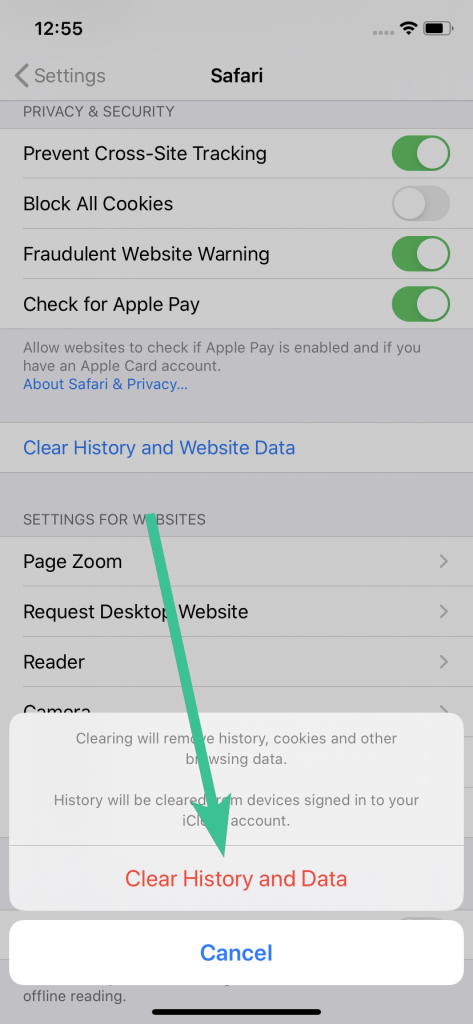
    Safari (iPhone or iPad)

    1. Tap the “Settings” icon. Then scroll down to the section that starts with “Passwords & Accounts”. Tap “Safari”
    2. In this view, scroll down and tap “Clear History and Website Data”.
    3. A pop up will appear at the bottom of the app. Tap “Clear History and Data”. to confirm.
    Clearing Cache in Chrome (Android)

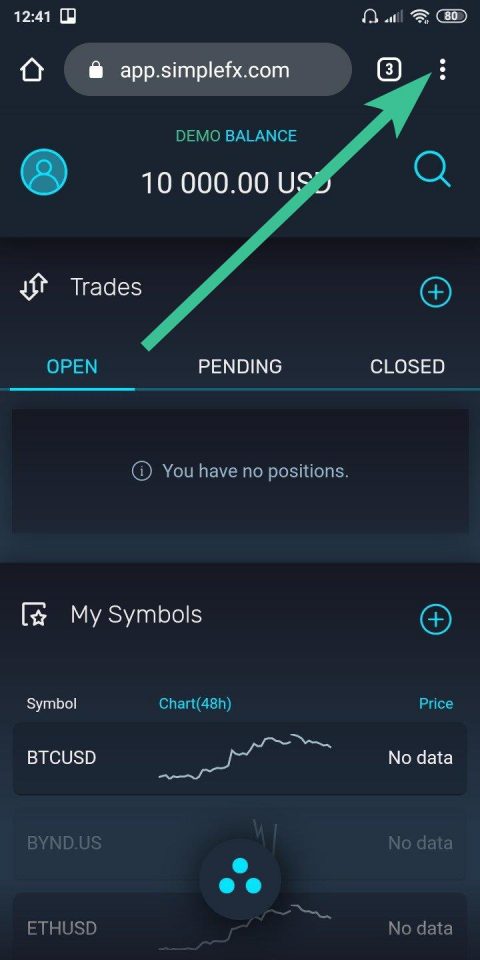
    Tap the “⋮” icon to enter the browser’s menu. Go to the “History” tab.
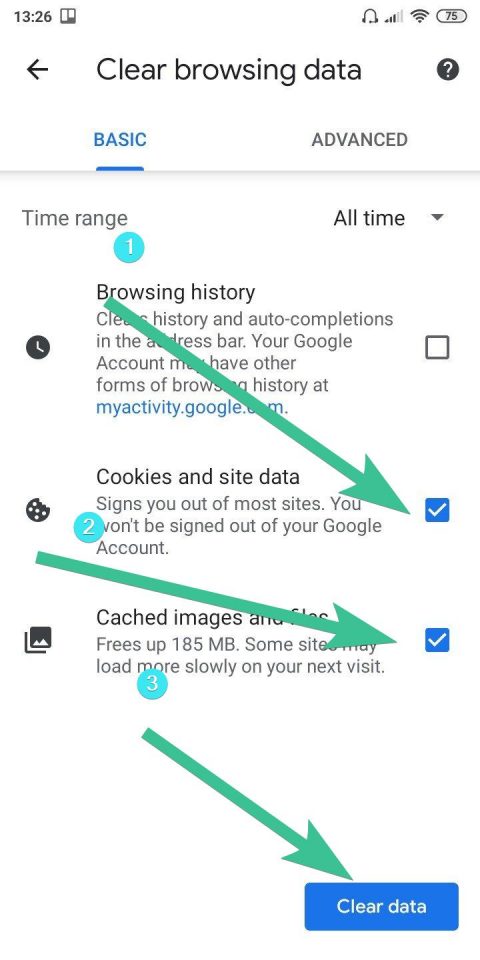
    The “Cookies and site data” (1) and “Cached images and files” (2) should be checked by default. If they are not, make sure they are on.

    Finally, tap the “Clear data” button.
    Clearing Cache in Firefox (Android)

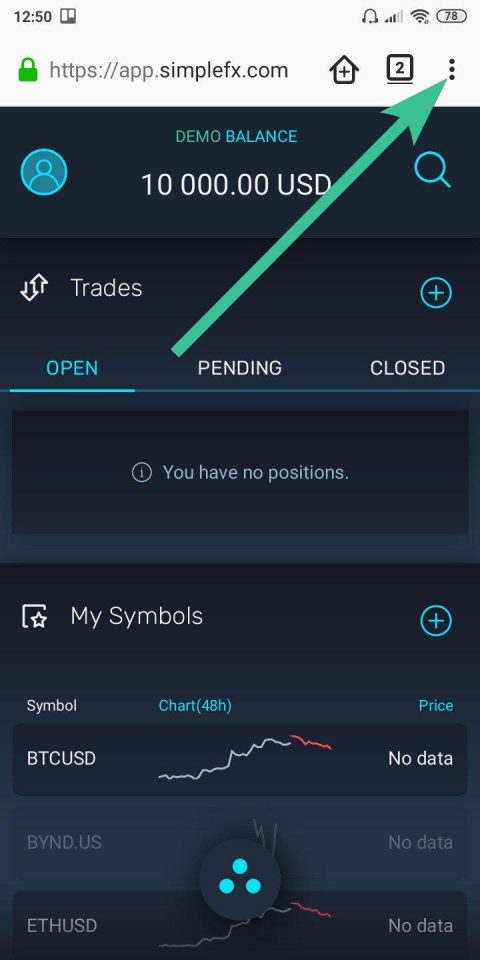
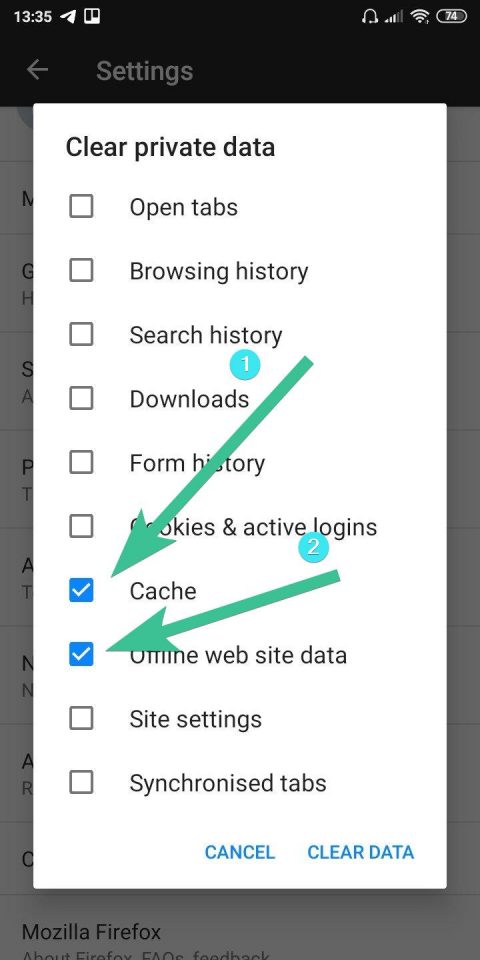
    Tap the “⋮” icon to enter the browser’s menu. Go to the “Setting” tab. Scroll down to the “Clear private data” section.
    Make sure that “Cache” (1) and “Offline web site data (2) are checked. Tap the “Clear data” button.
     

    After clearing your cache, you can go back to app.simplefx.com, refresh the page, and trade with the newest version of our app.

    Share. Facebook Twitter Pinterest LinkedIn Tumblr Email Telegram Copy Link
    Previous ArticleSimpleFX Adds Beyond Meat Stocks. Up 84% in 2020 and Still Running
    Next Article EURUSD and GBPUSD on a Swing. Which One Will Break Out First?
    Zach Wright

    Related Posts

    Maximize Your Affiliate Profitability with SimpleFX’s New Affiliate Dashboard Component

    June 7, 2023

    Track Your Traffic. New Feature For SimpleFX Affiliates

    May 24, 2023

    SimpleFX Leverage Trading Guide

    March 17, 2023
    Leave Us a Review
    Review us on
    App Store
    Google Play
    Copyright © 2014 - 2025. 8Tech SVG Ltd (formerly SimpleFX Ltd) with registration number 22361 BC 2014 with registered address at Beachmont Business Centre, Suite 404, Kingstown VC0100, Saint Vincent and the Grenadines
    • SimpleFX WebTrader
    • Unilink Affiliate Tracker

    Type above and press Enter to search. Press Esc to cancel.