Close Menu
SimpleFX BlogSimpleFX Blog
    Facebook X (Twitter) Instagram
    Wednesday, November 12
    Facebook X (Twitter) LinkedIn Telegram YouTube
    SimpleFX BlogSimpleFX Blog
    Banner
    • Home
    • News
    • Tutorials
    • Updates
    • Trading Academy
    • Trading Schedule
    SimpleFX BlogSimpleFX Blog
    Home » How to open a pending order
    Tutorials

    How to open a pending order

    Natalia AlvarezBy Natalia AlvarezMay 29, 2022Updated:November 6, 2023No Comments2 Mins Read
    Facebook Twitter Pinterest LinkedIn Tumblr Email Telegram Copy Link

    A pending order will open when the conditions you set when placing it occurs. It’s simple. Let me show you how it works.

    First, find the instrument you want to trade and open an order. If you have problems doing it see our tutorials on searching and opening a market order.

    Let’s say I’d like to open a pending order for Renault SA stock at Paris Euronext. I want to take a short position once the stock price reaches a certain level.

    Once I open a “New order” window, I switch the tab from “MARKET” to “PENDING” and from “BUY” to “SELL”.
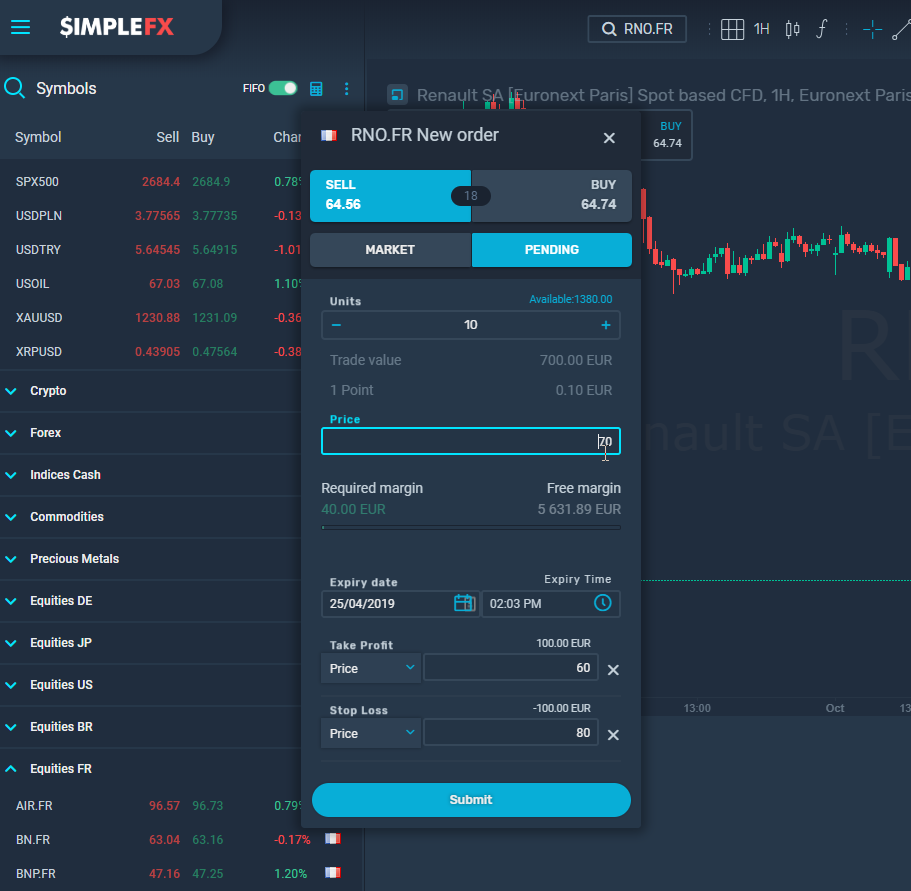
    Now let’s move to the lower part of the “New order” window. I assume that the stock will go down after climbing to the price of €70. I type in this value into the “Price” field.

    I’m trading on my demo account in euros. I choose to short sell just 10 units. My required margin is €40, but the trade value is €700, since on this account I’m trading with a 1:175 leverage.

    I am writing this article at 1:00 PM and set the expiry date for an hour ahead. If my pending order conditions are not met – Renault SA stock won’t reach €70 – within 1 hour my order will expire.

    Additionally, I set “Take Profit” at the stock price of €60 and “Stop Loss” at the price of €80. Which makes it a simple deal – I either earn or lose €100.

    I click “Submit” button and wait for my scenario to happen.

    As you can see pending orders are very convenient as you don’t have to observe all the charts in real time.

    begginers featured SimpleFX WebTrader trading
    Share. Facebook Twitter Pinterest LinkedIn Tumblr Email Telegram Copy Link
    Previous ArticleHow to open your first market order
    Next Article Changes to the Trading Calendar on June 2-3
    Natalia Alvarez

    Related Posts

    Crypto Month on SimpleFX – get a cashback for trading cryptocurrencies!

    August 20, 2025

    Ethereum turns 10 today! Here’s how we’re celebrating 

    July 30, 2025

    Top Use Cases of Ethereum: Beyond Cryptocurrency

    July 21, 2025
    Leave Us a Review
    Review us on
    App Store
    Google Play
    Copyright © 2014 - 2025. 8Tech SVG Ltd (formerly SimpleFX Ltd) with registration number 22361 BC 2014 with registered address at Beachmont Business Centre, Suite 404, Kingstown VC0100, Saint Vincent and the Grenadines
    • SimpleFX WebTrader
    • Unilink Affiliate Tracker

    Type above and press Enter to search. Press Esc to cancel.